
System configuration
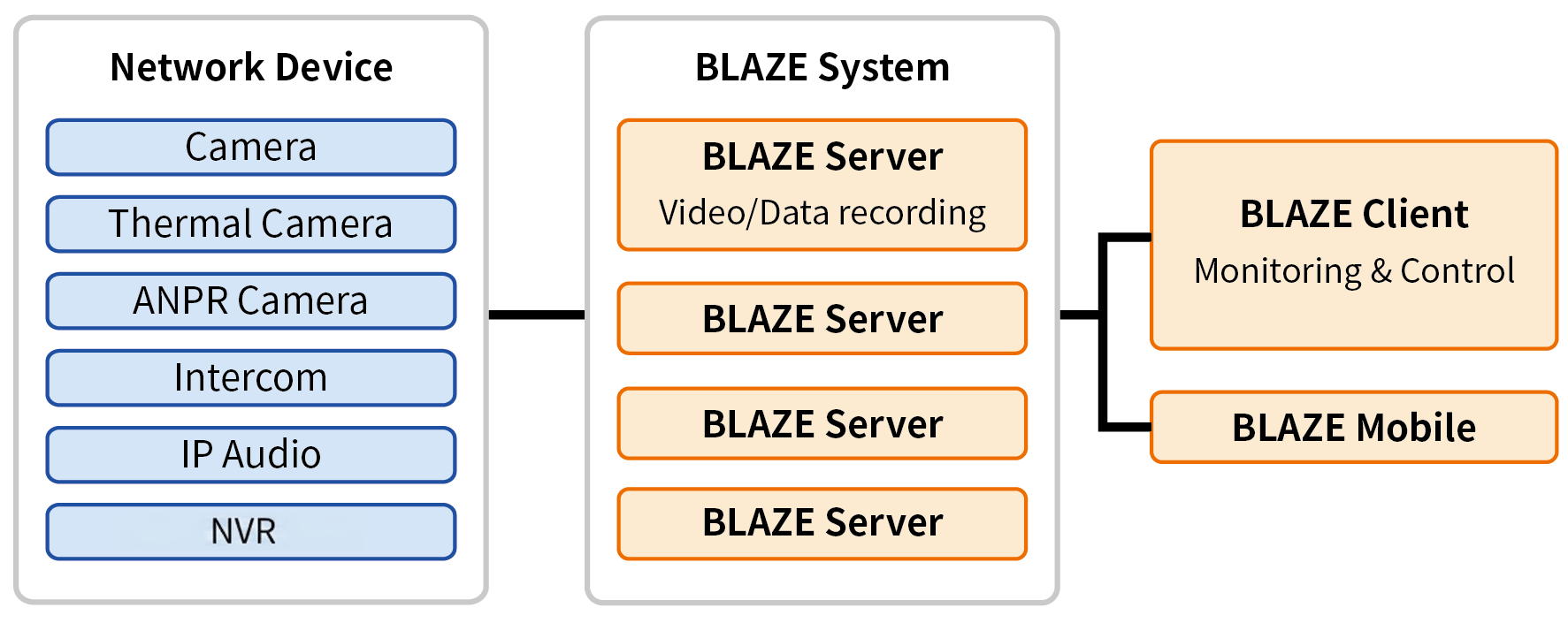
Adding devices and settings
After installing the server and client, add various network devices to monitor in the BLAZE system and configure detailed settings. Manage a variety of devices on the server, such as video detection devices connected to the network, IP speakers, and intercoms.
Server management
To set up the BLAZE system, first install server software on a PC where all video data and system settings will be stored. Once the server is running, check its status from the connected client and make necessary configurations for management. Additionally, view video files and image files such as maps stored on the PC where the server is installed, and add webpages from the client.
Client use
View videos from the server in the client software on a PC and configure various functions for management. Configure all server functions from the client, and if the system is linked to the cloud, view data stored in the cloud and check its status.
Cloud linking
Linking the BLAZE system to the cloud makes it possible to search for various videos and easily share them without connecting to a local server.
Mobile app use
When connecting to the BLAZE server from a smartphone or tablet, monitor real-time video from connected devices, and search and save recorded videos. The mobile app provides selected features most commonly used in VMS, but does not offer the full functionality of the client software.
User management
Users accessing the BLAZE system are assigned specific permissions based on their objectives. System administrators can set various permissions tailored to the objectives to manage users effectively. Register and integrate cloud accounts and easily manage user accounts from an existing LDAP server.