
Viewing health monitoring alerts
When an issue occurs in the BLAZE system, an alert appears in the Alert tray in the Tab bar. Use the Alert panel to review system health and diagnose issues.
To view health monitoring alerts
- Click
 in the Tab bar.
 - Check detailed information in the Alert panel.
- Click Open health monitoring to open the Health monitoring tab.
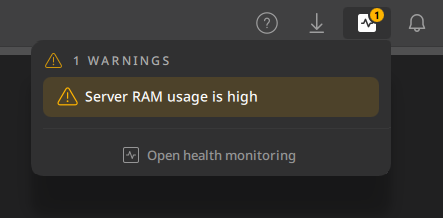
- Click Open health monitoring to open the Health monitoring tab.
Alert items
Use the items displayed in the Alert panel to check issues detected in the system.
| Alert | Appears when | Resolved when |
|---|---|---|
| Camera “[Camera name]” is offline | Camera goes offline | Camera is back online |
| Server “[Server name]” is offline | Server goes offline | Server is back online |
| “[Disk name]” disk write failure | A disk write failure occurs due to physical damage or a permission issue | There is no more read/write error |
| Server “[Server name]” - “[disk name]” disk write error | A write operation is rejected on a specific disk installed in the server | There is no more read/write error |
| Server CPU usage is high | Average CPU usage over the last 10 seconds exceeds 80% | Average CPU usage over the last 10 seconds drops below 80% |
| Server RAM usage is high | RAM usage reaches 90% | RAM usage drops below 90% |
| Disk "[Disk name]" SMART error occurred | A storage device reports a S.M.A.R.T. error and its status is "At risk" | The S.M.A.R.T. status is no longer "At risk" |
| Server "[Server name]" - disk "[disk name]" SMART error occurred | A storage device on the server reports a S.M.A.R.T. error and its status is "At risk" | The S.M.A.R.T. status for the disk is no longer "At risk" |
| Disk "%1" is nearing its I/O limit | Disk I/O usage is approaching the threshold that may affect system performance. Factors such as the number of channels assigned to the server, recording quality, and HDD hardware performance can affect disk I/O usage. | Disk I/O usage returns to the normal range |
| Disk "%1" has exceeded its I/O limit | Disk I/O usage has exceeded the threshold that may affect system performance. Factors such as the number of channels assigned to the server, recording quality, and HDD hardware performance can affect disk I/O usage. | Disk I/O usage returns to the normal range |
| Server certificate expires in [number] days | The certificate expires in [number] days |
|
| Server certificate has expired | Server certificate has expired | A valid certificate is installed on the server |
| Cannot connect to NTP server | The server fails to connect to NTP server | The server restores connection to NTP server |
| Failover - [number] devices have been moved to server “[Server name]” temporarily | There is failover and cameras are moved temporarily to another server | The failover/fallback has ended |
| Software update is available | Software update is available | The software has been updated to the latest version |