
Monitoring licenses
The BLAZE system provides a comprehensive overview of license status.
- Total licenses: The total number of licenses registered in the system
- Used: The number of licenses currently in use. (When license usage is enabled for a specific device via Settings > Devices > Recording, the number of used licenses increases by one.)
- Available: The number of licenses currently available for activation
- Update eligibility: The date until which license support and updates are available (displayed based on the earliest expiration date among the currently used license keys. If no license is in use, the latest expiration date among the available license keys may be displayed instead.)
Registered licenses and their details are displayed for reference.
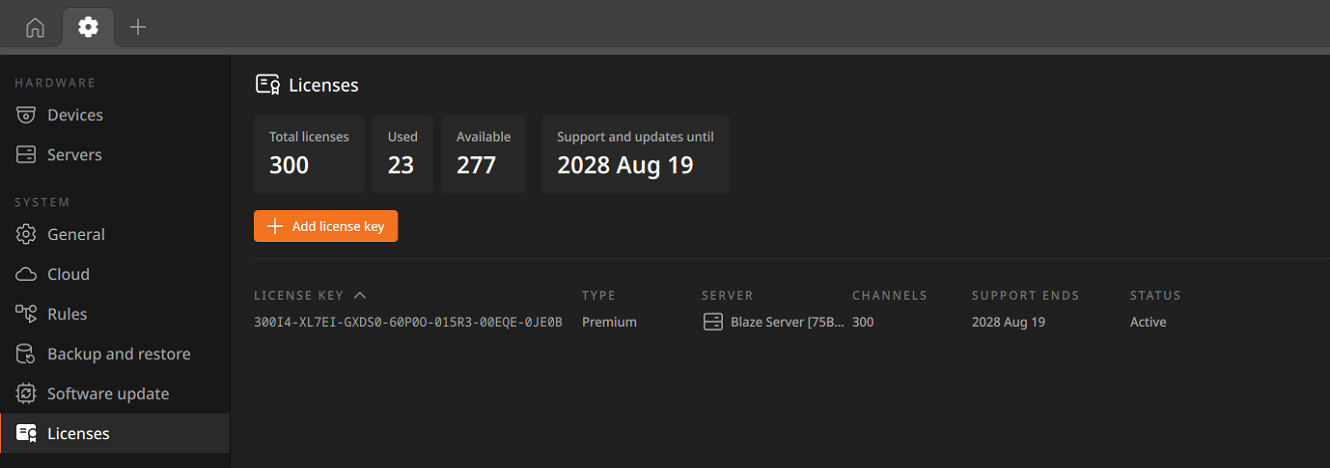
- License key: License key number
- Type: License type (displayed as ‘Onboarding’, ‘Trial’, ‘Premium’, ‘SUP’)
- Channels: Number of channels activated under the license
- Support ends: Support and update expiration date
- Status: Current status of the License
- Active: The license is activated and functioning normally
- Expired: The license period has ended, and recording functions are disabled. (Applies only to free and trial licenses.)
- Support ended: Recording functions remain available, but software updates are no longer supported after the license end date.
- Invalid: The license has been invalidated and is no longer usable