
View tab
To open the View tab, select View on the Home page or click  on the tab bar. Run a saved layout or assign devices and other items to the Scene panel for real-time monitoring.
The View tab consists of the following elements:
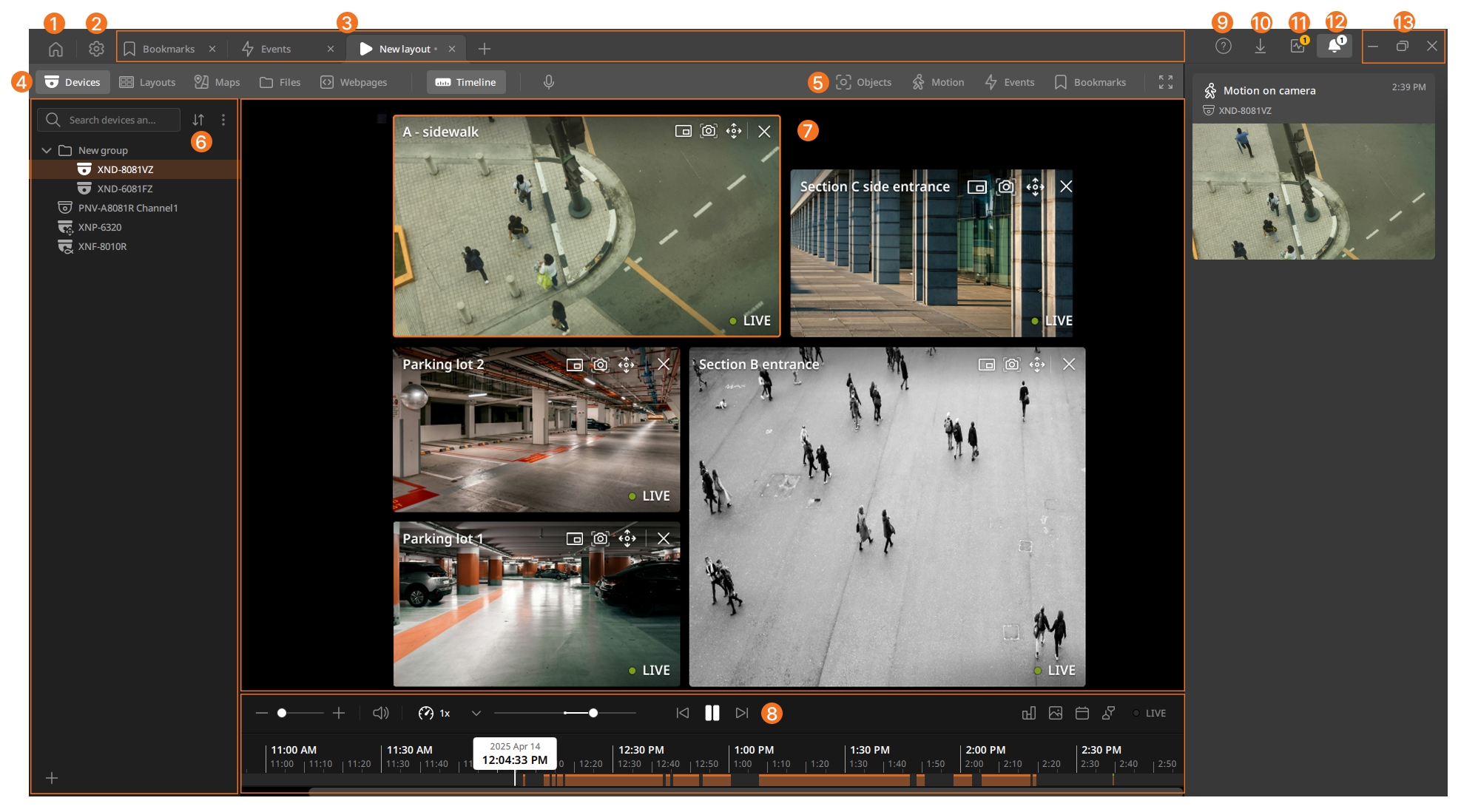
| No. | Item | Description |
|---|---|---|
| ❶ |  |
Navigate to the Home page. |
| ❷ |  |
Open the Settings menu. |
| ❸ | Tab bar | View the currently open layout tabs and menu tabs. |
| ❹ | View tab navigation bar | View various function tabs available during real-time monitoring.
|
| ❺ | Objects/Motion/Events/Bookmarks panel | The list of objects, motion, events, and bookmarks. |
| ❻ | Devices/Layouts/Maps/Files/Webpages panel | The list of devices, layouts, maps, files, and webpages. |
| ❼ | Scene panel | Area of the View tab where cameras and other items can be placed. |
| Tile | A single element that can be placed in the Scene panel, such as a camera tile, webpage tile, file tile, or speaker tile. | |
| Layout | A set of cameras and other items (images, webpages, video files) that can be saved for quick access. | |
| ❽ | Timeline panel | Play recorded videos and save them as files. |
| Timeline | Section of the Timeline panel with recordings and time markers. | |
| Time marker | White or gray block showing the current playback time or the time at the mouse pointer position. | |
| Histogram | Section of the Timeline panel showing histograms for objects, motion, and events. | |
| Thumbnails | Section of the Timeline panel showing preview images for different moments in the video archive. | |
| ❾ | Help | Access the BLAZE user guide and program information. |
| ❿ | Export tray | Click  to view the save history for videos, screenshots, diagnostic files, and logs. to view the save history for videos, screenshots, diagnostic files, and logs. |
| ⓫ | Health monitoring alert tray | Check alert items displayed to administrators in the Health monitoring tab for monitoring system status.
|
| ⓬ | Events notification panel | Check notifications in real time when events with a notification action occur according to the configured event rules.
|
| ⓭ | Client control | Control the client window.
|
 : Output audio to cameras assigned to the layout.
 : View the video in full screen.
 icon at the top of the client. Click the icon to open the Events notification panel.
 : Minimize the client window.
 : Maximize the client window.
 : Close the client.