
Extending licenses
The Software Update Plan (SUP) license can be used to extend the support period of a Premium license.
If a SUP license is applied after the Premium license has expired, the new support end date is calculated based on the extension date. (e.g., if a license that expired in 2020 is extended in 2025 with a 3-year SUP license, the new support end date will be 2028.)
Even if the extended license is deactivated and reactivated, the extended support end date remains unchanged.
To extend a license
License extension can be performed either online or offline, similar to license activation. The following steps describe how to extend a license in an online environment where the client PC is connected to the internet:
- Log in to the system with Administrator privileges.
- Click Settings > Licenses.
- Select the license to extend from the list and right-click.
- From the shortcut menu, select Extend license key.
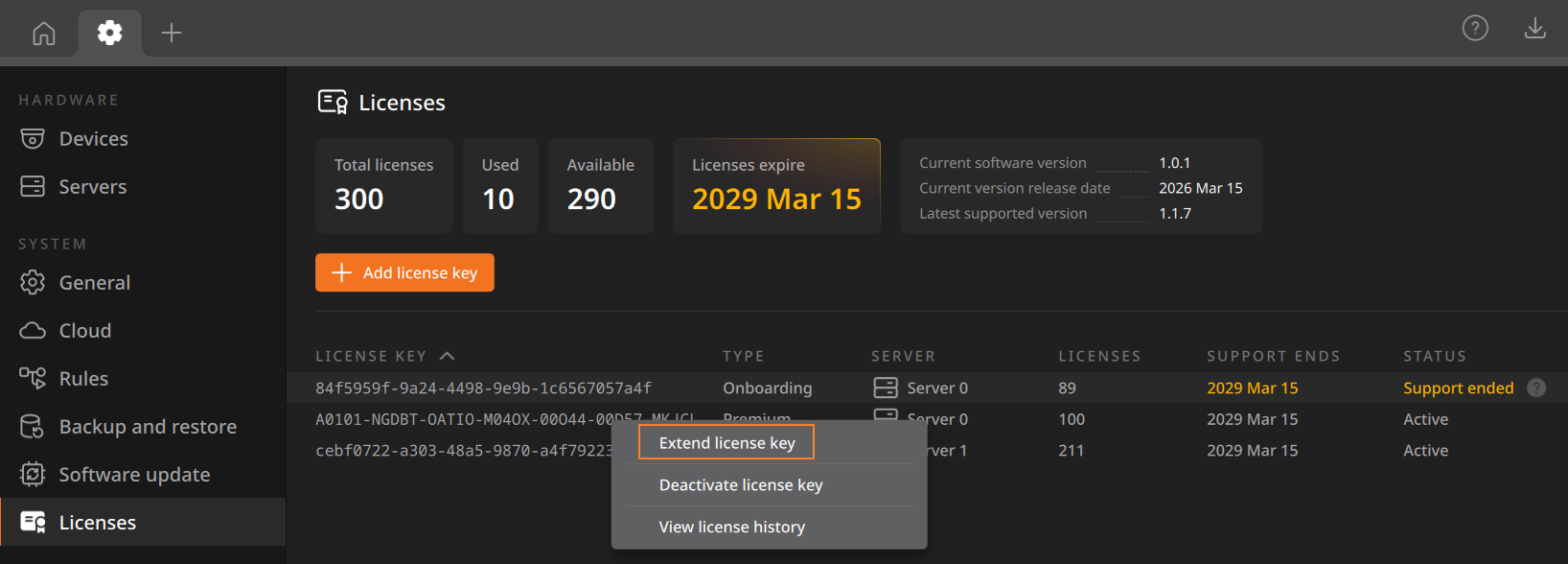
- In the Extend license key dialog, select Online activation, enter the license key, and click Next.
- Review the extended license information and click Close to exit the window.
License grace period
If the server with an applied license experiences a failure, a 30-day grace period is provided. After this period, the license will be suspended.