
Managing an LDAP user
When BLAZE synchronizes with the LDAP server, user information registered in the LDAP server is added to BLAZE. View and modify the information of users retrieved from the LDAP server in Users.
Even without a separate user account in BLAZE, log in to the client with LDAP user credentials to monitor.
Note: If login fails using LDAP credentials, check the following:
- The network connectivity status between the LDAP server and BLAZE
- Whether the password input rules match between the LDAP server and BLAZE
- Mapping between LDAP UID and BLAZE user ID
- Whether the user authentication methods supported by the LDAP server match the authentication settings in BLAZE.
- Ensure that authentication methods such as Simple bind and SASL bind are set consistently.
To check user information on the LDAP server
- Click Settings > Users.
- Check the list in the LDAP USERS section at the bottom of the list of users.
- Users added in BLAZE will be displayed in the LOCAL USERS section.
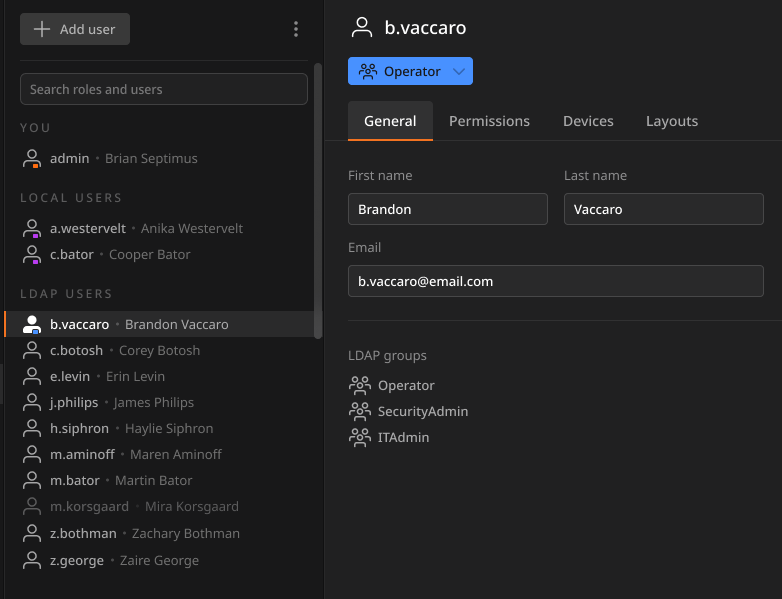 Note: User information imported from an LDAP server cannot be modified or deleted.
- However, if you select Disable for Link roles with LDAP groups, you can change the user's role only.
- Users added in BLAZE will be displayed in the LOCAL USERS section.